
订阅转换服务
第一章:认识订阅转换
一、是什么
因市面上的翻墙软件(内核)众多,支持的订阅格式各不相同,所以就需要一个可以转换订阅格式的工具。
一般搭建一个订阅转换服务都分为后端与前端。
- 后端:实际负责处理订阅转换的核心程序。
- 前端:户交互界面,提供方便的方式让用户输入订阅链接、选择转换格式的静态网页。
二、开源项目
subconverter
后端
asdlokj1qpi233 开发的 subconverter
基于 tindy2013 开发。
基于 tindy2013 开发。
前端
Sub-Store
- 后端:Sub-Store
- 前端-网页:Sub-Store-Front-End
- 前端-APP:SubCase
- 构建好的 docker 镜像:xream/sub-store - Docker Image
第二章:搭建
一、subconverter
1. 搭建步骤
1)运行后端
原版:
shell
docker run -d --restart=always --name subconverter-tindy2013 -p 25500:25500 tindy2013/subconverter:latest
# then check its status
curl http://localhost:25500/version
# if you see `subconverter vx.x.x backend` then the container is up and runningMetaCubeX 修改版:
shell
docker run -d --restart=always --name subconverter-metacubex -p 25501:25500 metacubex/subconverter:latest
# then check its status
curl http://localhost:25500/version
# if you see `subconverter vx.x.x backend` then the container is up and running2)反向代理
shell
# 把NMP加入到bridge网络中
docker network connect bridge nginx-proxy-app

docker network ls

docker inspect subconverter-metacubex3)搭建前端 Subweb
方法一
shell
docker run -d --name=Sub2Web -p 8091:80 -e PUID=0 -e PGID=0 -e TZ=Asia/Shanghai --restart always careywong/subweb[1] 修改源码
shell
# Clone 项目到本地
git clone https://github.com/CareyWang/sub-web.git
cd sub-web

# 编辑 .env 配置文件
vi .env
# 修改后端地址、短链接地址
VUE_APP_SUBCONVERTER_DEFAULT_BACKEND = "https://subapi.imgki.com"  # API 后端
VUE_APP_MYURLS_API = "https://s.imgki.com/short"                   # 短链接后端

# 编辑 ./src/views/Subconverter.vue
cd src/views
vi Subconverter.vue
# 修改
placeholder="由雨下田上维护 |  https://subapi.xxx.me/sub?",
backendOptions: [{ value: "https://subapi.xxx.me/sub?" }],
remoteConfig: [{}, {}, {} ...],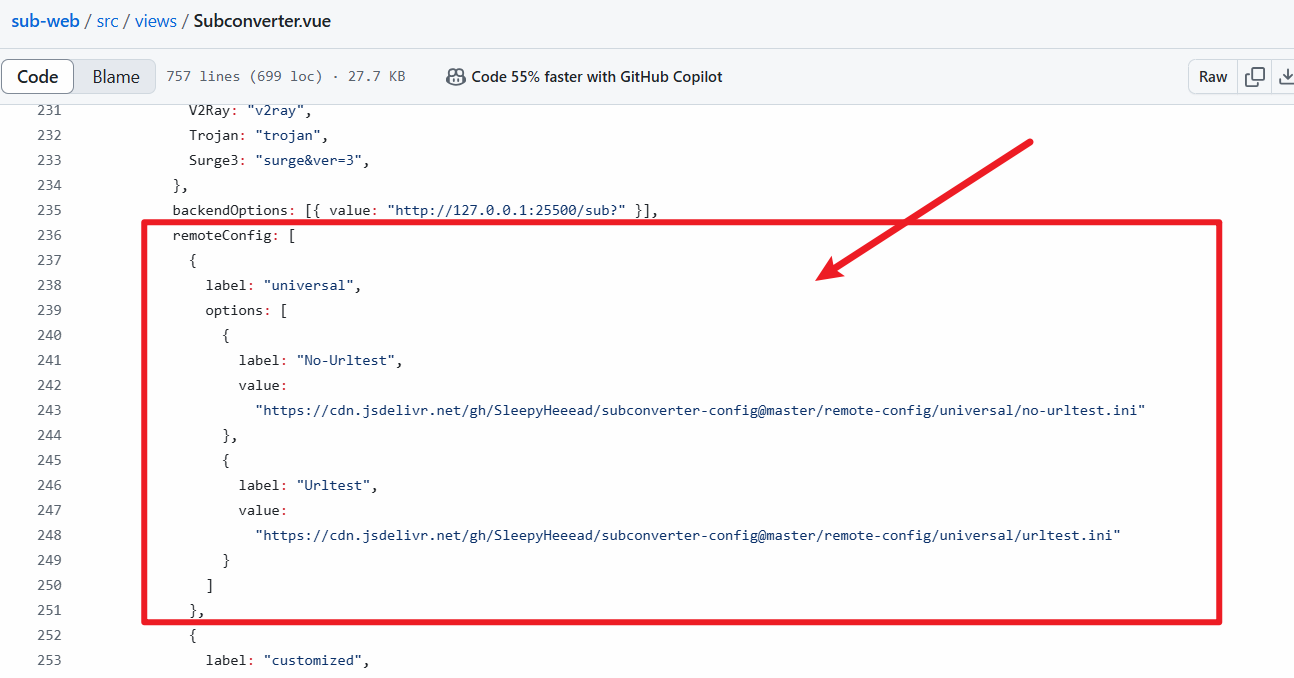
[2] 构建镜像&部署
shell
#构建镜像
docker build -t subweb-local:latest .

#部署服务
docker run -d -p 58080:80 --restart always --name subweb subweb-local:latest4)搭建短域名 Myurls
项目地址:https://github.com/CareyWang/MyUrls
shell
# clone 项目到本地
git clone https://github.com/CareyWang/MyUrls.git MyUrls
cd MyUrls
vi public/index.html
const backend = 'https://s.2z.pw'  # 修改短链接域名

cd MyUrls
cp .env.example .env  # 编辑好域名、端口等配置

docker-compose up -d # 直接启动二、Sub-Store
部署服务:
shell
docker run -it -d \
--restart=always \
-e "SUB_STORE_BACKEND_SYNC_CRON=55 23 * * *" \
-e SUB_STORE_FRONTEND_BACKEND_PATH=/AkNkSUNd5malUQkRKT \
-p 0.0.0.0:6951:3001 \
-v /opt/sub-store:/opt/app/data \
--name sub-store \
xream/sub-store:2.19.66-http-meta访问:
http://yourip:3001/?api=http://YOURIP:3001/BACK_END_PASSWORD
https://你的域名?api=https://你的域名/刚刚生成20位随机字符串参考文章
subconverter
Sub-Store