
TypeScript 笔记
第一章:走进 TS 世界
一、是什么?
TypeScript 简称 TS,是 JavaScript 的超集(JS 有的 TS 都有)。所有的 JS 代码都是 TS 代码。
TypeScript = Type + JavaScript(在 JS 基础上,加了类型支持)
TypeScript 是微软开发的开源编程语言,可以在任何运行 JavaScript 的地方运行。
1. 为什么有 TS 之类的工具?
JS 在运行代码前,其实不知道函数调用的结果。类似:
message.toLowerCase();
// message 否能调用?
// message 是否有一个 toLowerCase 属性?
// 如果有 toLowerCase 是可以被调用的吗?
// 如果可以被调用,会返回什么?因此,就需要静态类型系统,可以在 JS 运行前先计算出值的类型(包括值的类型,有什么属性和方法),在决定是否执行程序。还可以代码补全、快速修复(类型检查器有了类型信息,可以在你输入的时候列出可使用的属性、方法)。
2. TS 能干什么?
显示类型
// string, Date就是相应person,date的注解(签名),当不符合定义的类型时就会抛出错误
function greet(person: string, date: Date)同时,TS 类型系统可以正确推断出一些标识符相应的类型。
类型抹除
TypeScript 代码经过 TSC 转换为 JavaScript 代码。
降级
将高版本的 ECMAScript 语法转为低版本的过程就叫做降级,默认转化为 ES3。tsc --target es2015 xxx.ts 指定版本。
严格模式
TS 赋予了用户调整代码检查的颗粒度。在 TypeScript 的配置文件 tsconfig.json 中进行配置。
"strict": true严格模式。noImplicitAny选项设置为true,表示在 TypeScript 代码中,如果一个变量的类型推断为any,但没有明确指定类型,那么 TypeScript 编译器将报错。strictNullChecks选项设置为true,表示在 TypeScript 代码中,null和undefined值将被严格检查,不能赋值给其他类型的变量,除非这个变量的类型明确包含了null或undefined。
……
3. 快速入门
1)安装
npm install -g typescript2)创建一个 ts 文件
3)使用 tsc 对 ts 文件进行编译(网页不认 ts 文件,这里要使用编译器将 ts 文件转换成 js 文件)
执行命令:tsc xxx.ts
运行成功时,会在编译的 ts 文件下产生一个 js 文件;否则,报相关的错误。错误时仍旧生成 JS 文件。
tsc --noEmitOnError:noEmitOnError 在发生错误时不生成输出。
4)运行编译好的 js 文件。node xxx.js
简化 TS 运行的步骤
问题:每次都要先生成 js,然后执行 js。
简化方式:使用 ts-node 包,直接在 Node.js 中执行 TS 代码。
首先需要安装它。
npm install -g ts-node
# 或者
yarn global add ts-node使用 ts-node 命令来运行 TypeScript 文件。
ts-node my-script.ts第二章:类型系统
TypeScript 是 JS 的超集,TS 提供了 JS 的所有功能,并且额外的增加了类型系统。
JS 有类型(比如,number / string 等),但是 JS 不会检查变量的类型是否发生变化。而 TS 会检查。
TypeScript 类型系统的主要优势:可以显示标记出代码中的意外行为,从而降低了发生错误的可能性。
JS 已有类型
原始类型:number string boolean null undefined symbol bigInt
对象类型:object 包括数组 (array) 、对象、函数等对象
TS 新增类型
联合类型、自定义类型、接口、元组 (tuple) 、字面量类型、枚举 (enum) 、void、any 等。
类型注解
当使用
const、var或let声明一个变量时,可以选择性的添加一个类型注解,显式指定变量的类型:typescriptlet myName: string = "Alice";不过大部分时候,这不是必须的。因为 TypeScript 会自动推断类型。
一、基础类型
number、string、boolean、null、undefined、void、array、tuple、enum、any。
1. void
如果函数没有返回值,那么,函数返回值类型为:void
function greet(name: string): void {
    console.log('hello', name)
}注意:void 是 TS 新增的。
2. 数组
声明一个类似于 [1, 2, 3] 的数组类型,需要用到语法 number[]。这个语法可以适用于任何类型。也可能看到这种写法 Array<number>,是一样的。
let numbers: number[] = [1, 3, 5]
let numbers2: Array<number> = [1, 2, 3]ReadonlyArray 类型
ReadonlyArray 并不是一个可以用的构造器函数。需要这样使用:
const roArray: ReadonlyArray<string> = ["red", "green", "blue"];更简短的写法 readonly Type[]。
function doStuff(values: readonly string[]) {
  // We can read from 'values'...
  const copy = values.slice();
  console.log(`The first value is ${values[0]}`);

  // ...but we can't mutate 'values'.
  values.push("hello!"); // 属性 'push' 在类型 'readonly string[]' 上不存在。
}
Arrays和ReadonlyArray并不能双向的赋值。也就是可读可写数组可以赋值给只读数组,但只读数组不能赋值给可读可写数组。
3. 元组
声明
元组类型是另一种类型的数组(或者说是数组的特例),它确切地知道包含多少个元素,以及特定索引对应的类型。
let position1: [number, number] = [29.1, 23.2];上述代码含义解释:
元组类型可以确切地标记出有多少个元素,以及每个元素的类型。
该示例中,元素有两个元素,每个元素的类型都是 number。
该元组规定了只能有 2 个元素,再给第三个元素就会报错。
除了长度检查,简单的元组类型跟声明了 length 属性和具体的索引属性的 Array 是一样的。
interface StringNumberPair {
  // specialized properties
  length: 2;
  0: string;
  1: number;

  // Other 'Array<string | number>' members...
  slice(start?: number, end?: number): Array<string | number>;
}可选属性
在元组类型中,也可以写一个可选属性,但可选元素必须在最后面,而且也会影响类型的 length 。
type Either2dOr3d = [number, number, number?];

function setCoordinate(coord: Either2dOr3d) {
  const [x, y, z] = coord;
  // const z: number | undefined

  console.log(`Provided coordinates had ${coord.length} dimensions`);
  // (property) length: 2 | 3
}剩余元素语法
Tuples 也可以使用剩余元素语法,但必须是 array/tuple 类型:
type StringNumberBooleans = [string, number, ...boolean[]];
type StringBooleansNumber = [string, ...boolean[], number];
type BooleansStringNumber = [...boolean[], string, number];有剩余元素的元组并不会设置 length,因为它只知道在不同位置上的已知元素信息:
const a: StringNumberBooleans = ["hello", 1];
const b: StringNumberBooleans = ["beautiful", 2, true];
const c: StringNumberBooleans = ["world", 3, true, false, true, false, true];

console.log(a.length); // (property) length: number

type StringNumberPair = [string, number];
const d: StringNumberPair = ['1', 1];
console.log(d.length); // (property) length: 2可选元素和剩余元素的存在,使得 TypeScript 可以在参数列表里使用元组,就像这样:
function readButtonInput(...args: [string, number, ...boolean[]]) {
  const [name, version, ...input] = args;
  // ...
}基本等同于:
function readButtonInput(name: string, version: number, ...input: boolean[]) {
  // ...
}readonly 元组类型
元组类型也是可以设置 readonly 的:
function doSomething(pair: readonly [string, number]) {
  pair[0] = "hello!"; // 不能赋值给 '0',因为它是一个只读属性。
}如果我们给一个数组字面量 const 断言,也会被推断为 readonly 元组类型。
let point = [3, 4] as const; // 从 number[] 转变为了只读元组

function distanceFromOrigin([x, y]: [number, number]) {
  return Math.sqrt(x ** 2 + y ** 2);
}

distanceFromOrigin(point);

// 类型 'readonly [3, 4]' 的参数不能赋值给类型 '[number, number]' 的参数。
// 类型 'readonly [3, 4]' 是 'readonly',不能赋值给可变的类型 '[number, number]'。尽管 distanceFromOrigin 并没有更改传入的元素,但函数希望传入一个可变元组。因为 point 的类型被推断为 readonly [3, 4],它跟 [number number] 并不兼容,所以 TypeScript 给了一个报错。
4. 枚举
枚举的功能类似于字面量类型 + 联合类型组合的功能,也可以表示一组明确的可选值。
枚举:定义一组命名常量。它描述一个值,该值可以是这些命名常量中的一个。定义好枚举后,可以使用枚举名称作为一种类型。
关键字:enum + 枚举名称 + {枚举的可选值,逗号隔开}。
1)定义
enum Direciton { Up, Down, Left, Right };2)使用
function changeDirection1(direction: Direciton) {
    console.log(direction);
}解释:
使用 enum 关键字定义枚举。
约定枚举名称、枚举中的值以大写字母开头。
枚举中的多个值之间通过 ,(逗号)分隔。
定义好枚举后,直接使用枚举名称作为类型注解。
注意:形参 direction 的类型为枚举 Direction,那么,实参的值就应该是枚举 Direction 成员的任意一个。
3)访问枚举成员
changeDirection1(Direciton.Down); // 枚举成员是有值的,默认为:从 0 开始自增的数值。解释:类似于 JS 中的对象,直接通过点(.)语法访问枚举的成员。
4)枚举成员的值
问题:我们把枚举成员作为了函数的实参,既然可以把枚举成员作为函数的实参,那么它肯定是有值的,那么它的值是什么呢?
通过将鼠标移入 Direction.Up,可以看到枚举成员 Up 的值为 0。
注意:枚举成员是有值的,默认为:从 0 开始自增的数值。
数字枚举
把枚举成员的值为数字的枚举,称为数字枚举。
// Up = 10, Down = 11, Left = 12, Right = 13
enum Direciton { Up = 10, Down, Left, Right };

enum Direciton1 { Up = 2, Down = 4, Left = 6, Right = 8 };字符串枚举
字符串枚举是枚举成员的值是字符串。
enum Direciton1 { Up = 'UP', Down = 'DOWN', Left = 'LEFT', Right = 'RIGHT' };注意:字符串枚举没有自增长行为,因此,字符串枚举的每个成员必须有初始值。
5)原理
枚举是 TypeScript 添加的新特性,用于描述一个值可能是多个常量中的一个。不同于大部分的 TypeScript 特性,这并不是一个类型层面的增量,而是会添加到语言和运行时。例如:
enum Color {
  Red,
  Green,
  Blue
}会被编译为以下 JavaScript 代码:
var Color;
(function (Color) {
    Color[Color["Red"] = 0] = "Red";
    Color[Color["Green"] = 1] = "Green";
    Color[Color["Blue"] = 2] = "Blue";
})(Color || (Color = {}));Color[Color["Red"] = 0] = "Red";:这行代码做了两件事。首先,它在Color对象中添加了一个名为"Red"的属性,其值为0。然后,它又在Color对象中添加了一个名为0的属性,其值为"Red"。这样,你就可以通过Color.Red访问0,也可以通过Color[0]访问"Red"。
6)建议
一般情况下,推荐使用字面量类型 + 联合类型组合的方式,因为相比枚举,这种方式更加直观、简洁、高效。(其他的类型会在编译为 JS 代码时自动移除。但是,枚举类型会被编译为 JS 代码!),因为枚举会被编译为 js,开销要比前者大。
5. any
TypeScript 有一个特殊的类型 any,当不希望一个值导致类型检查错误的时候,就可以设置为 any。
当一个值是 any 类型的时候,可以获取它的任意属性(也会被转为 any 类型),或者像函数一样调用它,把它赋值给一个任意类型的值,或者把任意类型的值赋值给它,再或者是其他语法正确的操作,都可以:
let obj: any = { x: 0 };
// 以下任何一行代码都不会引发编译器错误。
// 使用“any”将禁用所有进一步的类型检查,并且假设您比TypeScript更了解环境。
obj.foo();
obj();
obj.bar = 100;
obj = "hello";
const n: number = obj;当不想写一个长长的类型代码,仅仅想让 TypeScript 知道某段特定的代码是没有问题的,any 类型是很有用的。
二、函数类型
1. 指定参数、返回值的类型
1)单独指定
[1] 参数类型注解
当声明一个函数的时候,可以在每个参数后面添加一个类型注解,声明函数可以接受什么类型的参数。参数类型注解跟在参数名字后面:
// 参数类型注解
function greet(name: string) {
  console.log("Hello, " + name.toUpperCase() + "!!");
}当参数有了类型注解的时候,TypeScript 便会检查函数的实参:
// 如果执行,将会是一个运行时错误
greet(42); // 类型“number”的参数不能赋值给类型“string”的参数即便对参数没有做类型注解,TypeScript 依然会检查传入参数的数量是否正确。
[2] 返回值类型注解
也可以添加返回值的类型注解。返回值的类型注解跟在参数列表后面:
function getFavoriteNumber(): number {
  return 26;
}即使没有标注,TypeScript 也会基于它的
return语句推断函数的返回类型。
2)同时指定
解释:当函数作为表达式时,可以通过类似箭头函数形式的语法来为函数添加类型。
注意:这种形式只适用于函数表达式。
const add2: (num1: number, num2: number) => number = (num1, num2) => {
    return num1 + num2
}详细解析一下这段代码:
const add2:定义了一个名为add2的常量。(num1: number, num2: number) => number:这是一个函数类型,表示函数接收两个number类型的参数,并返回一个number类型的结果。= (num1, num2) => { return num1 + num2 }:这是一个箭头函数,它接收两个参数num1和num2,并返回它们的和。
匿名函数有一点不同于函数声明,当 TypeScript 知道一个匿名函数将被怎样调用的时候,匿名函数的参数会被自动的指定类型。这个过程被称为上下文推断(contextual typing),因为正是从函数出现的上下文中推断出了它应该有的类型。
typescript// 虽然代码中没有类型注解,但是 TypeScript 仍然能够发现潜在的错误 const names = ["Alice", "Bob", "Eve"]; // 函数的上下文类型推断 names.forEach(function (s) { console.log(s.toUppercase()); // 类型 'string' 上不存在属性 'toUppercase'。你是不是想要 'toUpperCase'? }); // 上下文类型推断也适用于箭头函数 names.forEach((s) => { console.log(s.toUppercase()); // 类型 'string' 上不存在属性 'toUppercase'。你是不是想要 'toUpperCase'? });尽管参数
s并没有添加类型注解,但 TypeScript 根据forEach函数的类型,以及传入的数组的类型,最后推断出了s的类型。
函数类型表达式
typescripttype GreetFunction = (a: string) => void; function greeter(fn: GreetFunction) { // ... }
2. 调用签名
调用签名是一种特殊的类型,它描述了一个函数的参数类型和返回值类型。你可以在一个对象类型中写一个调用签名,这样这个对象类型就同时包含了函数和属性。
例如,以下代码定义了一个带有属性的函数:
type MyFunctionWithProperties = {
  (x: number, y: number): number;  // 这是调用签名
  description: string;  // 这是一个属性
};

let func: MyFunctionWithProperties = function(x, y) { return x + y; };
func.description = "A function that adds two numbers";在这个例子中,MyFunctionWithProperties 是一个带有属性的函数类型,它有一个调用签名 (x: number, y: number): number 和一个属性 description。func 是一个符合这个类型的函数,你可以像调用普通函数一样调用它,也可以访问它的 description 属性。
3. 构造签名
JavaScript 函数也可以使用 new 操作符调用,当被调用的时候,TypeScript 会认为这是一个构造函数 (constructors),因为他们会产生一个新对象。你可以写一个构造签名,方法是在调用签名前面加一个 new 关键词:
type SomeConstructor = {
  new (s: string): SomeObject;
};

function fn(ctor: SomeConstructor) {
  return new ctor("hello");
}一些对象,比如 Date 对象,可以直接调用,也可以使用 new 操作符调用,而你可以将调用签名和构造签名合并在一起:
interface CallOrConstruct {
  new (s: string): Date;
  (n?: number): number;
}4. 可选参数
使用函数实现某个功能时,参数可以传也可以不传。这种情况下,在给函数参数指定类型时,就用到可选参数了。
比如,数组的 slice 方法,可以 slice() 也可以 slice(1) 还可以 slice(1, 3)
function mySlice(num1?: number, num2?: number): void {
    console.log('起始索引', num1, '结束索引', num2)
}

mySlice(1, 2)可选参数:在可传可不传的参数名称后面添加 ?(问号)。
注意:可选参数只能出现在参数列表的最后,也就是说可选参数后面不能再出现必选参数。
三、对象类型
JS 中的对象是由属性和方法构成的,而 TS 中对象的类型就是在描述对象的结构(有什么类型的属性和方法)。
1. 定义
对象类型可以是匿名的
// 对象类型
let person: { name: string; age: number; sayHi(): void} = {
    name: 'jack',
    age: 25,
    sayHi() {}
}解释:
直接使用 {} 来描述对象结构。属性采用属性名: 类型的形式;方法采用方法名(): 返回值类型的形式。
如果方法有参数,就在方法名后面的小括号中指定参数类型(比如:greet(name: string): void)。
在一行代码中指定对象的多个属性类型时,使用 ;(分号)来分隔。如果一行代码只指定一个属性类型(通过换行来分隔多个属性类型),可以去掉 ;(分号)。也可以使用
,分开属性,最后一个属性的分隔符加不加都行。typescriptlet person: { name: string age: number sayHi(): void } = { name: 'jack', age: 25, sayHi() {} }每个属性对应的类型是可选的,如果你不指定,默认使用
any类型。方法的类型也可以使用箭头函数形式(比如:{ sayHi: () => void })
typescriptlet person: { name: string; age: number; sayHi: () => void } = { name: 'jack', age: 25, sayHi() {} }
也可以使用接口进行定义
当一个对象类型被多次使用时,一般会使用接口(interface)来描述对象的类型,达到复用的目的。
interface Point {
  x: number;
  y: number; // 每一行只有一个属性类型,因此,属性类型后可以没有分号
}

function printCoord(pt: Point) {
  console.log("The coordinate's x value is " + pt.x);
  console.log("The coordinate's y value is " + pt.y);
}

let point1: Point = {
    x: 100,
    y: 100
}

printCoord(point1);还可以通过类型别名定义。
类型别名和接口的不同
类型别名和接口非常相似,大部分时候,可以任意选择使用。接口的几乎所有特性都可以在
type中使用,两者最关键的差别在于类型别名本身无法添加新的属性,而接口是可以扩展的。
2. 属性修饰符
1)对象可选属性
在属性后面加个问号。
// 对象可选属性
function myAxios(config: {url: string; method?: string }) {

}

myAxios(
    {
        url: 'string'
    }
)可选属性的语法与函数可选参数的语法一致,都使用 ?(问号)来表示。
在 JavaScript 中,如果你获取一个不存在的属性,你会得到一个 undefined 而不是一个运行时错误。因此,当你获取一个可选属性时,你需要在使用它前,先检查一下是否是 undefined。
function printName(obj: { first: string; last?: string }) {
  // 错误 - 如果没有提供 'obj.last',可能会崩溃!
  console.log(obj.last.toUpperCase());
  // 对象可能是 'undefined'
  if (obj.last !== undefined) {
    // OK
    console.log(obj.last.toUpperCase());
  }

  // 使用现代 JavaScript 语法的安全替代方案
  console.log(obj.last?.toUpperCase());
}还可以使用对象解构赋值,在形参列表中。
2)readonly 属性
一个标记为 readonly 的属性是不能被写入的(不会改变任何运行时的行为,主要是为了在编译时期提供类型检查)。但 readonly 仅仅表明属性本身是不能被重新写入的。
interface Home {
  readonly resident: { name: string; age: number };
}

function visitForBirthday(home: Home) {
  // 我们可以读取和更新 'home.resident' 的属性。
  console.log(`Happy birthday ${home.resident.name}!`);
  home.resident.age++;
}

function evict(home: Home) {
  // 但是我们不能直接写入 'Home' 上的 'resident' 属性。
  home.resident = {
    // 不能赋值给 'resident',因为它是一个只读属性。
    name: "Victor the Evictor",
    age: 42,
  };
}TypeScript 在检查两个类型是否兼容的时候,并不会考虑两个类型里的属性是否是 readonly,这就意味着,readonly 的值是可以通过别名修改的。
interface Person {
  name: string;
  age: number;
}

interface ReadonlyPerson {
  readonly name: string;
  readonly age: number;
}

let writablePerson: Person = {
  name: "Person McPersonface",
  age: 42,
};

// works (正常运行)
let readonlyPerson: ReadonlyPerson = writablePerson;

console.log(readonlyPerson.age); // prints '42'
writablePerson.age++;
console.log(readonlyPerson.age); // prints '43'3)索引签名
不能提前知道一个类型里的所有属性的名字,但是知道这些值的特征。这种情况,就可以用一个索引签名来描述可能的值的类型。
interface StringArray {
  [index: number]: string;
}

const myArray: StringArray = getStringArray();
const secondItem = myArray[1]; // const secondItem: string一个索引签名的属性类型必须是 string 或者是 number。虽然 TypeScript 可以同时支持 string 和 number 类型,但数字索引的返回类型一定要是字符索引返回类型的子类型。这是因为当使用一个数字进行索引的时候,JavaScript 实际上把它转成了一个字符串。
interface Animal {
  name: string;
}

interface Dog extends Animal {
  breed: string;
}

// 错误:使用数字字符串进行索引可能会得到一个完全不同类型的 Animal!
interface NotOkay {
  [x: number]: Animal; // 'number' 索引类型 'Animal' 不能赋值给 'string' 索引类型 'Dog'。
  [x: string]: Dog;
}尽管字符串索引用来描述字典模式非常的有效,但也会强制要求所有的属性要匹配索引签名的返回类型。
interface NumberDictionary {
  [index: string]: number;

  length: number; // ok
  name: string; // 类型为 'string' 的属性 'name' 不能赋值给 'string' 索引类型 'number'。
}然而,如果一个索引签名是属性类型的联合,那各种类型的属性就可以接受了:
interface NumberOrStringDictionary {
  [index: string]: number | string;
  length: number; // ok, length is a number
  name: string; // ok, name is a string
}最后,也可以设置索引签名为 readonly。
interface ReadonlyStringArray {
  readonly [index: number]: string;
}

let myArray: ReadonlyStringArray = getReadOnlyStringArray();
myArray[2] = "Mallory"; // 类型 'ReadonlyStringArray' 的索引签名只允许读取。因为索引签名是 readonly ,所以无法设置 myArray[2] 的值。
3. 属性继承
如果两个接口之间有相同的属性或方法,可以将公共的属性或方法抽离出来,通过继承来实现复用。接口也可以继承多个类型。
例如:Point2D 和 Point3D,都有 x、y 两个属性,这样要重复写两次,可以这样做,但是很繁琐。
interface Point2D {
    x: number
    y: number
}

interface Point3D {
    x: number
    y: number
    z: number
}更好的方式,接口继承。
interface Point2D {
    x: number
    y: number
}

interface Point3D extends Point2D {
    z: number
}解释:
使用 extends(继承)关键字实现了接口 Point3D 继承 Point2D。
继承后,Point3D 就有了 Point2D 的所有属性和方法(此时,Point3D 同时有 x、y、z 三个属性)。
接口继承的使用场景:有 2 个以上的接口有相同的属性,那么就可以将公共的属性或方法进行抽取到一个接口中,然后使用继承实现公共属性或方法的复用。
四、高级类型
1. 联合类型
联合类型(Union Types)是一种复合类型,表示一个值可以是几种类型之一。
联合类型使用管道符(|)分隔每个类型。这意味着一个值可以是 type1 或 type2 或 type3 等。
let value: number | string;

value = 123; // OK
value = '123'; // OK
value = true; // 错误:类型“boolean”不可分配给类型“number | string”在使用中注意括号问题。例如:
添加小括号,表示首先 arr 是数组,其次数组元素是 number 或者是 string。
let arr: (number | string )[] = [1, 'a', 4, 'b', 4]另外一种情况,不添加括号,表示 arr 既可以是数字 number,也可以是字符串数组。
let arr: number | string[] = 122. 类型别名
类型别名(Type Aliases)是一种创建新名称的方式,可以为任何类型创建一个新的名字,然后在代码中使用这个新的名字来代表原来的类型。
类型别名是通过 type 关键字来定义的。
type StringOrNumber = string | number;

let value: StringOrNumber;
value = 'hello'; // OK
value = 123; // OK3. 字面量类型
是什么
除了常见的类型 string 和 number ,也可以将类型声明为更具体的数字或者字符串。
众所周知,在 JavaScript 中,有多种方式可以声明变量。比如 var 和 let ,这种方式声明的变量后续可以被修改,还有 const ,这种方式声明的变量则不能被修改,这就会影响 TypeScript 为字面量创建类型。
let changingString = "Hello World";
changingString = "Olá Mundo";
// 因为“changinString”可以表示任何可能的字符串,所以TypeScript在类型系统中就是这样描述它的
// let changingString: stringconst constantString = "Hello World";
// 由于“constantString”只能表示1个可能的字符串,因此它具有文字类型表示
// const constantString: "Hello World"字面量类型本身并没有什么太大用:
let x: "hello" = "hello";
// OK
x = "hello";
// ...
x = "howdy"; // 类型“howdy”不可分配给类型“hello”。如果结合联合类型,就显得有用多了。举个例子,当函数只能传入一些固定的字符串时:
function printText(s: string, alignment: "left" | "right" | "center") {
  // ...
}
printText("Hello, world", "left");
printText("G'day, mate", "centre"); // 类型为“center”的参数不可分配给类型为“left”|“right”|“center””的参数数字字面量类型也是一样的:
function compare(a: string, b: string): -1 | 0 | 1 {
  return a === b ? 0 : a > b ? 1 : -1;
}当然了,也可以跟非字面量类型联合:
interface Options {
  width: number;
}
function configure(x: Options | "auto") {
  // ...
}
configure({ width: 100 });
configure("auto");
configure("automatic"); // 类型为“automatic”的参数不可分配给类型为“Options|”auto“”的参数还有一种字面量类型,布尔字面量。因为只有两种布尔字面量类型, true 和 false ,类型 boolean 实际上就是联合类型 true | false 的别名。
字面量推断
declare function handleRequest(url: string, method: "GET" | "POST"): void;

const req = { url: "https://example.com", method: "GET" };
handleRequest(req.url, req.method); // 类型 'string' 的参数不能赋值给类型 '"GET" | "POST"' 的参数。在上面这个例子里,req.method 被推断为 string ,而不是 "GET",因为在创建 req 和 调用 handleRequest 函数之间,可能还有其他的代码,或许会将 req.method 赋值一个新字符串比如 "Guess" 。所以 TypeScript 就报错了。
有两种方式可以解决:
添加一个类型断言改变推断结果:
typescript// Change 1: const req = { url: "https://example.com", method: "GET" as "GET" }; // Change 2 handleRequest(req.url, req.method as "GET");修改 1 表示“我有意让
req.method的类型为字面量类型"GET",这会阻止未来可能赋值为"GUESS"等字段。修改 2 表示“我知道req.method的值是"GET"。也可以使用
as const把整个对象转为一个类型字面量:typescriptconst req = { url: "https://example.com", method: "GET" } as const; handleRequest(req.url, req.method);as const效果跟const类似,但是对类型系统而言,它可以确保所有的属性都被赋予一个字面量类型,而不是一个更通用的类型比如string或者number。
4. 交叉类型
TypeScript 也提供了名为交叉类型(Intersection types)的方法,用于合并已经存在的对象类型。
交叉类型的定义需要用到 & 操作符:
interface Colorful {
  color: string;
}
interface Circle {
  radius: number;
}

type ColorfulCircle = Colorful & Circle;这里,我们连结 Colorful 和 Circle 产生了一个新的类型,新类型拥有 Colorful 和 Circle 的所有成员。
function draw(circle: Colorful & Circle) {
  console.log(`Color was ${circle.color}`);
  console.log(`Radius was ${circle.radius}`);
}

// okay
draw({ color: "blue", radius: 42 });

// oops
draw({ color: "red", raidus: 42 });
// “类型为 '{ color: string; raidus: number; }' 的参数不能赋值给 'Colorful & Circle' 类型的参数。对象字面量只能指定已知的属性,但 'raidus' 在 'Colorful & Circle' 类型中不存在。你是想写 'radius' 吗?”接口继承与交叉类型对比(Interfaces vs Intersections)
这两种方式在合并类型上看起来很相似,但实际上还是有很大的不同。最原则性的不同就是在于冲突怎么处理,这也是你决定选择哪种方式的主要原因。
interface Colorful {
  color: string;
}

interface ColorfulSub extends Colorful {
  color: number
}

// “接口 'ColorfulSub' 不正确地扩展了接口 'Colorful'。属性 'color' 的类型不兼容。类型 'number' 不能赋值给类型 'string'。”使用继承的方式,如果重写类型会导致编译错误,但交叉类型不会:
interface Colorful {
  color: string;
}

type ColorfulSub = Colorful & {
  color: number
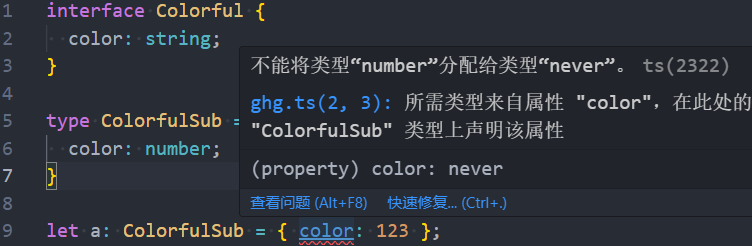
}虽然不会报错,那 color 属性的类型是什么呢,答案是 never,取得是 string 和 number 的交集。
五、类
TypeScript 完全支持 ES2015 引入的 class 关键字。TypeScript 提供了类型注解和其他语法,允许你表达类与其他类型之间的关系。
1. 定义类
class Point {}2. 类成员
class Point {
  // 字段 / 属性
  x: number;
  // 会阻止在构造函数之外的赋值
  readonly y: number;
  // 设置初始值后,不写类型注解,ts 也会自动推断类型的。z: number
  z = 0;

  _size = 0;
// ************************************************************************************
  // 类的构造函数:跟函数非常类似,可以使用带类型注解的参数、默认值、重载等。
  /*
    构造函数不能有类型参数。
    构造函数不能有返回类型注解,因为总是返回类实例类型。
  */
  constructor(x: number, y: string);
  constructor(s: string);
  constructor(xs: any = 0, y?: any = 0) {
    // TBD
  }
// ************************************************************************************
  // 方法
  scale(n: number): void {
    this.x *= n;
    this.y *= n;
  }
// ************************************************************************************
  // Getters / Setter 存取器
  /*
    如果 get 存在而 set 不存在,属性会被自动设置为 readonly。
    如果 setter 参数的类型没有指定,它会被推断为 getter 的返回类型。
    getters 和 setters 必须有相同的成员可见性。
    从 TypeScript 4.3 起,存取器在读取和设置的时候可以使用不同的类型。
  */
  // 注意这里返回的是 number 类型
  get size(): number {
    return this._size;
  }

  // 注意这里允许传入的是 string | number | boolean 类型
  set size(value: string | number | boolean) {
    let num = Number(value);

    // 不允许 NaN、Infinity 等
    if (!Number.isFinite(num)) {
      this._size = 0;
      return;
    }

    this._size = num;
  }
// ************************************************************************************
  // 索引签名,和对象类型的索引签名是一样的。
  /*
    索引签名类型也是要捕获方法的类型。
  */
  [s: string]: boolean | ((s: string) => boolean);
  check(s: string) {
    return this[s] as boolean;
  }
// ************************************************************************************
  // 静态成员
  /*
    静态成员同样可以使用 public protected 和 private 这些可见性修饰符。
    静态成员也可以被继承。
    静态成员不应该引用类的类型参数。
    覆写 Function 原型上的属性是不可以的。
  */
  static f = 0;
  static printX() {
    console.log(Point.x);
  }
// ************************************************************************************
  // 类静态块
  /*
    静态块允许写一系列有自己作用域的语句,也可以获取类里的私有字段。
    这意味着我们可以安心的写初始化代码:正常书写语句,无变量泄漏,还可以完全获取类中的属性和方法。
  */
  static {
    try {
      const lastInstances = loadLastInstances();
       Foo.#count += lastInstances.length;
    }
    catch {}
  }
}如果有一个基类,需要在使用任何
this.成员之前,要先在构造函数里调用super()。忘记调用super是 JavaScript 中一个简单的错误,但是 TypeScript 会在需要的时候提醒你。typescriptclass Base { k = 4; } class Derived extends Base { constructor() { // 在 ES5 中打印错误的值; 在 ES6 中抛出异常。 console.log(this.k); // 在派生类的构造函数中访问 'this' 之前,必须调用 'super'。 super(); } }
3. 类继承
1)implements
使用 implements 语句检查一个类是否满足一个特定的 interface。如果一个类没有正确的实现它,TypeScript 会报错。
类也可以实现多个接口。
interface Pingable {
  ping(): void;
}

class Sonar implements Pingable {
  ping() {
    console.log("ping!");
  }
}

class Ball implements Pingable {
  // 'Ball' 类错误地实现了 'Pingable' 接口。
  // 'Ball' 类型缺少 'Pingable' 类型所需的 'ping' 属性。
  pong() {
    console.log("pong!");
  }
}注意事项
implements 语句仅仅检查类是否按照接口类型实现,但它并不会改变类的类型或者方法的类型。一个常见的错误就是以为 implements 语句会改变类的类型 —— 然而实际上它并不会:
implements 关键字在 TypeScript 中主要用于强制类遵循特定的结构,而不是用于改变类的类型或者方法的类型。
interface Checkable {
  check(name: string): boolean;
}

class NameChecker implements Checkable {
  check(s) {
    // 参数 's' 隐式具有 'any' 类型。
    // 注意这里不会报错,因为是 any。
    return s.toLowercse() === "ok"; // any
}在这个例子中,可能会以为 s 的类型会被 check 的 name: string 参数影响。实际上并没有,implements 语句并不会影响类的内部是如何检查或者类型推断的。
类似的,实现一个有可选属性的接口,并不会创建这个属性:
interface A {
  x: number;
  y?: number;
}
class C implements A {
  x = 0;
}
const c = new C();
c.y = 10; // 属性 'y' 不存在于类型 'C' 上。2)extends
类可以 extend 一个基类。一个派生类有基类所有的属性和方法,还可以定义额外的成员。
一个派生类可以覆写一个基类的字段或属性,也可以使用 super 语法访问基类的方法。
TypeScript 强制要求派生类总是它的基类的子类型,派生类需要遵循着它的基类的实现。
初始化顺序
类初始化的顺序,就像在 JavaScript 中定义的那样:
- 基类字段初始化
- 基类构造函数运行
- 派生类字段初始化
- 派生类构造函数运行
class Base {
  name = "base";
  constructor() {
    console.log("My name is " + this.name);
  }
}

class Derived extends Base {
  name = "derived";
}

// 打印 "base",而不是 "derived"。
const d = new Derived();继承内置类型
问题
在 ES2015(也称为 ES6)中,当在子类的构造函数中调用
super()时,它会调用父类的构造函数,并返回父类构造函数的结果。如果父类构造函数返回了一个对象,那么这个对象会替换子类构造函数中的this。在 ES2015 中,内置对象(如
Error,Array等)的构造函数会使用new.target来调整原型链。new.target是一个在构造函数中可用的元属性,它引用的是正在构造的类。这使得内置对象的子类可以正确地继承父类的行为。javascriptfunction Test() { console.log(new.target); } Test(); // 输出:undefined new Test(); // 输出:[Function: Test]但是,在 ES5 中,没有
new.target这样的特性。因此,当使用 ES5 或者将 ES6 代码转换为 ES5 代码的时,内置对象的子类可能无法正确地继承原始类的行为。举例:typescriptclass MsgError extends Error { constructor(m: string) { super(m); } sayHello() { return "hello " + this.message; } }
- 对象的方法可能是
undefined,所以调用sayHello会导致错误。instanceof失效,(new MsgError()) instanceof MsgError会返回false。解决
手动的在
super(...)调用后调整原型:typescriptclass MsgError extends Error { constructor(m: string) { super(m); // 显式地设置原型 Object.setPrototypeOf(this, MsgError.prototype); } sayHello() { return "hello " + this.message; } }
4. 成员可见性
可以使用 TypeScript 控制某个方法或者属性是否对类以外的代码可见。
public:这是默认的可见性。公共成员在任何地方都可以访问。protected:受保护的成员可以在类的内部和子类内部中访问,但不能使用类的实例调用。受保护成员的公开
typescriptclass Base { protected m = 10; } class Derived extends Base { // 没有修饰符,所以默认为 '公开'。 m = 15; } const d = new Derived(); console.log(d.m); // OK交叉等级受保护成员访问
typescriptclass Base { protected x: number = 1; } class Derived1 extends Base { protected x: number = 5; } class Derived2 extends Base { f1(other: Derived2) { other.x = 10; } f2(other: Base) { other.x = 10; // 属性 'x' 是受保护的,只能通过 'Derived2' 类的实例访问。这是 'Base' 类的一个实例。 } }private:私有成员只能在类的内部访问。这意味着,不能从类的实例或子类中访问私有成员。交叉实例私有成员的获取
typescriptclass A { private x = 10; public sameAs(other: A) { // No error return other.x === this.x; } }
5. this
1)this 参数
在 TypeScript 方法或者函数的定义中,第一个参数且名字为 this 有特殊的含义。该参数会在编译的时候被抹除:
// TypeScript input with 'this' parameter
function fn(this: SomeType, x: number) {
  /* ... */
}// JavaScript output
function fn(x) {
/* ... */
}TypeScript 会检查一个有 this 参数的函数在调用时是否有一个正确的上下文。可以给方法定义添加一个 this 参数,静态强制方法被正确调用:
class MyClass {
  name = "MyClass";
  getName(this: MyClass) {
    return this.name;
  }
}
const c = new MyClass();
// OK
c.getName();

// 错误,会导致崩溃
const g = c.getName;
console.log(g()); // 类型 'void' 的 'this' 上下文不能赋值给方法的 'MyClass' 类型的 'this'这个方法也有一些注意点,正好跟箭头函数相反:
- JavaScript 调用者依然可能在没有意识到它的时候错误使用类方法。
- 每个类一个函数,而不是每一个类实例一个函数。
- 基类方法定义依然可以通过
super调用。
2)this 类型
在类中,有一个特殊的名为 this 的类型,会动态的引用当前类的类型:
class Box {
  contents: string = "";
  set(value: string) {
	// (method) Box.set(value: string): this
    this.contents = value;
    return this;
  }
}这里,TypeScript 推断 set 的返回类型为 this 而不是 Box 。写一个 Box 的子类:
class ClearableBox extends Box {
  clear() {
    this.contents = "";
  }
}

const a = new ClearableBox();
const b = a.set("hello"); // const b: ClearableBo也可以在参数类型注解中使用 this :
class Box {
  content: string = "";
  sameAs(other: this) {
    return other.content === this.content;
  }
}不同于写 other: Box ,如果你有一个派生类,它的 sameAs 方法只接受来自同一个派生类的实例。
class Box {
  content: string = "";
  sameAs(other: this) {
    return other.content === this.content;
  }
}

class DerivedBox extends Box {
  otherContent: string = "?";
}

const base = new Box();
const derived = new DerivedBox();
derived.sameAs(base);
// 类型 'Box' 的参数不能赋值给类型 'DerivedBox' 的参数。
// 类型 'Box' 中缺少 'DerivedBox' 类型所需的 'otherContent' 属性。应用:基于 this 的类型保护
在 TypeScript 中,
this is Type是一种特殊的类型谓词,通常用在方法的返回类型位置。这种类型谓词表示方法的调用者(this)在方法返回后可以被视为Type类型。这种类型谓词在运行时并没有实际效果,但在编译时,TypeScript 会根据这个类型谓词来进行类型检查和推断。
例如,可以在一个类的方法中使用
this is Type来确保某个条件满足后,this可以被视为Type类型:typescriptclass MyClass { isType(): this is Type { // 在这里检查 this 是否可以被视为 Type 类型 // 如果可以,返回 true // 否则,返回 false } }如果
isType方法返回true,那么在调用isType方法后,this可以被视为Type类型。这样,就可以在类型安全的情况下访问Type类型的属性和方法。
可以在类和接口的方法返回的位置,使用 this is Type 。当搭配使用类型收窄 (举个例子,if 语句),目标对象的类型会被收窄为更具体的 Type。
class FileSystemObject {
  isFile(): this is FileRep {
    return this instanceof FileRep;
  }
  isDirectory(): this is Directory {
    return this instanceof Directory;
  }
  isNetworked(): this is Networked & this {
    return this.networked;
  }
  constructor(public path: string, private networked: boolean) {}
}

class FileRep extends FileSystemObject {
  constructor(path: string, public content: string) {
    super(path, false);
  }
}

class Directory extends FileSystemObject {
  children: FileSystemObject[];
}

interface Networked {
  host: string;
}

const fso: FileSystemObject = new FileRep("foo/bar.txt", "foo");

if (fso.isFile()) {
  fso.content; // const fso: FileRep
} else if (fso.isDirectory()) {
  fso.children; // const fso: Directory
} else if (fso.isNetworked()) {
  fso.host; // const fso: Networked & FileSystemObject
}一个常见的基于 this 的类型保护的使用例子,会对一个特定的字段进行懒校验(lazy validation)。举个例子,在这个例子中,当 hasValue 被验证为 true 时,会从类型中移除 undefined:
class Box<T> {
  value?: T;

  hasValue(): this is { value: T } {
    return this.value !== undefined;
  }
}

const box = new Box();
box.value = "Gameboy";

box.value; // (property) Box<unknown>.value?: unknown

if (box.hasValue()) {
  box.value; // (property) value: unknown
}6. 参数属性
TypeScript 提供了特殊的语法,可以把一个构造函数参数转成一个同名同值的类属性。这些就被称为参数属性(parameter properties)。
可以通过在构造函数参数前添加一个可见性修饰符 public private protected 或者 readonly 来创建参数属性,最后这些类属性字段也会得到这些修饰符:
class Params {
  constructor(
    public readonly x: number,
    protected y: number,
    private z: number
  ) {
    // 无需主体
  }
}
const a = new Params(1, 2, 3);
console.log(a.x); // (property) Params.x: number

console.log(a.z); // 属性 'z' 是私有的,只能在 'Params' 类内部访问7. 类表达式
const someClass = class<Type> {
  content: Type;
  constructor(value: Type) {
    this.content = value;
  }
};

const m = new someClass("Hello, world"); // const m: someClass<string>8. 抽象类和成员
TypeScript 中,类、方法、字段都可以是抽象的(abstract)。
抽象方法或者抽象字段是不提供实现的。这些成员必须存在在一个抽象类中,这个抽象类也不能直接被实例化。
抽象类的作用是作为子类的基类,让子类实现所有的抽象成员。当一个类没有任何抽象成员,他就会被认为是具体的。
例子:
abstract class Base {
  abstract getName(): string;

  printName() {
    console.log("Hello, " + this.getName());
  }
}

const b = new Base(); // 无法创建抽象类的实例不能使用 new 实例 Base 因为它是抽象类。需要写一个派生类,并且实现抽象成员。
class Derived extends Base {
  getName() {
    return "world";
  }
}

const d = new Derived();
d.printName();注意,如果忘记实现基类的抽象成员,会得到一个报错:
class Derived extends Base {
  // 非抽象类 'Derived' 没有实现从 'Base' 类继承的抽象成员 'getName'。
  // 忘记做任何事情。
}抽象构造签名
有的时候,希望接受传入可以继承一些抽象类产生一个类的实例的类构造函数。
举个例子,也许会写这样的代码:
function greet(ctor: typeof Base) {
  const instance = new ctor();
  // 无法创建抽象类的实例
  instance.printName();
}TypeScript 会报错,告诉你正在尝试实例化一个抽象类。毕竟,根据 greet 的定义,这段代码应该是合法的:
// 糟糕!
greet(Base);但如果你写一个函数接受传入一个构造签名:
function greet(ctor: new () => Base) {
  const instance = new ctor();
  instance.printName();
}
greet(Derived);

// 类型 'typeof Base' 的参数不能赋值给类型 'new () => Base' 的参数。
// 不能将抽象构造函数类型赋值给非抽象构造函数类型。
greet(Base);现在 TypeScript 会正确的告诉你,哪一个类构造函数可以被调用,Derived 可以,因为它是具体的,而 Base 是不能的。
9. 类之间的关系
大部分时候,TypeScript 的类跟其他类型一样,会被结构性比较。
举个例子,这两个类可以用于替代彼此,因为它们结构是相等的:
class Point1 {
  x = 0;
  y = 0;
}

class Point2 {
  x = 0;
  y = 0;
}

// OK
const p: Point1 = new Point2();类似的还有,类的子类型之间可以建立关系,即使没有明显的继承:
class Person {
  name: string;
  age: number;
}

class Employee {
  name: string;
  age: number;
  salary: number;
}

// OK
const p: Person = new Employee();这听起来有些简单,但还有一些例子可以看出奇怪的地方。
空类没有任何成员。在一个结构化类型系统中,没有成员的类型通常是任何其他类型的父类型。所以如果你写一个空类,任何东西都可以用来替换它:
class Empty {}

function fn(x: Empty) {
  // 对 'x' 无法进行任何操作,所以我不会这么做
}

// All OK!
fn(window);
fn({});
fn(fn);六、泛型
软件工程的一个重要部分就是构建组件,组件不仅需要有定义良好和一致的 API,也需要是可复用的(reusable)。好的组件不仅能够兼容今天的数据类型,也能适用于未来可能出现的数据类型,这在构建大型软件系统时会给你最大的灵活度。
在比如 C# 和 Java 语言中,用来创建可复用组件的工具,我们称之为泛型(generics)。利用泛型,我们可以创建一个支持众多类型的组件,这让用户可以使用自己的类型消费(consume)这些组件。
1. 泛型函数
需要一种可以捕获参数类型的方式,然后再用它表示返回值的类型。这里我们用了一个类型变量(type variable),一种用在类型而非值上的特殊的变量。
function identity<Type>(arg: Type): Type {
  return arg;
}

let myIdentity: <Type>(arg: Type) => Type = identity;有两种方式可以调用它。第一种方式是传入所有的参数,包括类型参数:
let output = identity<string>("myString"); // let output: string在这里,我们使用 <> 而不是 ()包裹了参数,并明确的设置 Type 为 string 作为函数调用的一个参数。
第二种方式可能更常见一些,这里我们使用了类型参数推断(type argument inference)(部分中文文档会翻译为“类型推论”),我们希望编译器能基于我们传入的参数自动推断和设置 Type 的值。
let output = identity("myString"); // let output: string注意这次我们并没有用 <> 明确的传入类型,当编译器看到 myString 这个值,就会自动设置 Type 为它的类型(即 string)。
2. 泛型接口
对象类型的调用签名的形式
function identity<Type>(arg: Type): Type {
  return arg;
}

let myIdentity: { <Type>(arg: Type): Type } = identity;{ <Type>(arg: Type): Type } 是一个对象类型,它有一个调用签名。这个调用签名是一个泛型函数,它接受一个参数 arg,参数的类型是 Type,并返回一个相同类型的值。Type 是一个类型变量,它代表任何类型。
这意味着你可以将任何符合这个调用签名的函数赋值给 myIdentity 变量。例如:
myIdentity = function<Type>(arg: Type): Type {
  return arg;
}在这个例子中,我们定义了一个泛型函数,并将这个函数赋值给 myIdentity。这个函数接受一个参数,并返回一个相同类型的值,所以它符合 { <Type>(arg: Type): Type } 的定义。
然后,你可以通过 myIdentity 变量来调用这个函数。例如:
let number = myIdentity(123);
let string = myIdentity('hello');在这个例子中,myIdentity(123) 调用了我们之前定义的函数,并传入了一个 number 类型的参数 123。myIdentity('hello') 调用了我们之前定义的函数,并传入了一个 string 类型的参数 'hello'。
泛型接口
让我们使用上个例子中的对象字面量,然后把它的代码移动到接口里:
interface GenericIdentityFn {
  <Type>(arg: Type): Type;
}

function identity<Type>(arg: Type): Type {
  return arg;
}

let myIdentity: GenericIdentityFn = identity;有的时候,我们会希望将泛型参数作为整个接口的参数,这可以让我们清楚的知道传入的是什么参数 (举个例子:Dictionary<string> 而不是 Dictionary)。而且接口里其他的成员也可以看到。
interface GenericIdentityFn<Type> {
  (arg: Type): Type;
}

function identity<Type>(arg: Type): Type {
  return arg;
}

let myIdentity: GenericIdentityFn<number> = identity;3. 泛型类
泛型类写法上类似于泛型接口。在类名后面,使用尖括号中 <> 包裹住类型参数列表:
class GenericNumber<NumType> {
  zeroValue: NumType;
  add: (x: NumType, y: NumType) => NumType;
}

let myGenericNumber = new GenericNumber<number>();
myGenericNumber.zeroValue = 0;
myGenericNumber.add = function (x, y) {
  return x + y;
};4. 泛型约束
基本使用
interface Lengthwise {
  length: number;
}

function loggingIdentity<Type extends Lengthwise>(arg: Type): Type {
  console.log(arg.length); // 现在我们知道它有一个 .length 属性,所以不再报错。
  return arg;
}现在这个泛型函数被约束了,它不再适用于所有类型:
loggingIdentity(3); // 类型 'number' 的参数不能赋值给类型 'Lengthwise' 的参数。需要传入符合约束条件的值:
loggingIdentity({ length: 10, value: 3 });在泛型约束中使用类型参数
希望获取一个对象给定属性名的值。为此,需要确保不会获取 obj 上不存在的属性。所以就要在两个类型之间建立一个约束:
function getProperty<Type, Key extends keyof Type>(obj: Type, key: Key) {
  return obj[key];
}

let x = { a: 1, b: 2, c: 3, d: 4 };

getProperty(x, "a");
getProperty(x, "m"); // 类型为 'm' 的参数不能赋值给类型为 'a' | 'b' | 'c' | 'd' 的参数。在泛型中使用类类型
function create<Type>(c: { new (): Type }): Type {
  return new c();
}5. 泛型工具类型
Typescript 提供了一些工具类型来辅助进行常见的类型转换,这些类型全局可用。
1)Partial<Type>
将一个类型 Type 中的所有属性都变为可选的。
type MyType = {
  a: number;
  b: string;
};使用 Partial<MyType>,会得到一个新的类型:
type PartialMyType = Partial<MyType>; // { a?: number; b?: string; }2)Required<Type>
将一个类型 Type 中的所有属性都变为必需的。
type MyType = {
  a?: number;
  b?: string;
};使用 Required<Type>,会得到一个新的类型:
type RequiredMyType = Required<MyType>; // { a: number; b: string; }3)Readonly<Type>
将一个类型 Type 中的所有属性都变为只读的。
type MyType = {
  a: number;
  b: string;
};使用 Readonly<MyType>,会得到一个新的类型:
type ReadonlyMyType = Readonly<MyType>; // { readonly a: number; readonly b: string; }4)Record<Keys, Type>
它可以创建一个类型,这个类型的属性名来自 Keys,属性值的类型为 Type。
例如,想创建一个类型,这个类型的属性名是 'a' 和 'b',属性值的类型是 number,可以使用 Record<'a' | 'b', number>:
type MyRecord = Record<'a' | 'b', number>; // { a: number; b: number; }5)Pick<Type, Keys>
从 Type 中挑选出一组属性 Keys,并创建一个新的类型。
type MyType = {
  a: number;
  b: string;
  c: boolean;
};使用 Pick<Type, Keys>,会得到一个新的类型:
type PickedType = Pick<MyType, 'a' | 'b'>; // { a: number; b: string; }6)Exclude<UnionType, ExcludedMembers>
可以从 UnionType 中排除出 ExcludedMembers,并创建一个新的类型。
例如,有一个联合类型:
type MyType = 'a' | 'b' | 'c';然后使用 Exclude<MyType, 'a' | 'b'>,会得到一个新的类型:
type ExcludedType = Exclude<MyType, 'a' | 'b'>; // 'c'7)Extract<Type, Union>
可以从 Type 中提取出可以赋值给 Union 的类型。
例如,有一个联合类型:
type MyType = 'a' | 'b' | 'c'然后使用 Extract<MyType, 'a' | 'b'>,会得到一个新的类型:
type ExtractedType = Extract<MyType, 'a' | 'b'>; // 'a' | 'b'七、类型断言
在 TypeScript 中,类型断言是一种方式,它允许你告诉编译器你比它更了解某个值的类型。类型断言并不会改变数据的实际类型,它只是在编译时期提供类型检查。
在 TypeScript 中,有两种语法可以进行类型断言:
尖括号语法
let someValue: any = "this is a string";
let strLength: number = (<string>someValue).length;as 语法
let someValue: any = "this is a string";
let strLength: number = (someValue as string).length;因为 someValue 是 any 类型,所以 TypeScript 不知道它有 length 属性,就需要使用类型断言来告诉 TypeScript,someValue 是 string 类型。
注意:在 TypeScript 中使用 JSX 时,只有 as 语法断言是被允许的。
疑问:怎么知道 a 标签的类型是 HTMLAnchorElement?怎么知道 div 的类型是什么,span 的类型又是什么?
技巧:选中那个标签,在浏览器控制台,通过 console.dir($0) 打印 DOM 元素,在属性列表的最后面,即可看到该元素的类型。
TypeScript 仅仅允许类型断言转换为一个更加具体或者更不具体的类型。
const x = "hello" as number;
// 将类型 'string' 转换为类型 'number' 可能是一个错误,因为这两种类型之间没有足够的重叠。如果这是有意为之,那么首先应将表达式转换为 'unknown' 类型。可以使用双重断言,先断言为 any (或者是 unknown),然后再断言为期望的类型:
const a = (expr as any) as T;非空断言操作符(后缀 !)(Non-null Assertion Operator)
非空断言操作符 ! 是一种类型断言,它告诉 TypeScript 编译器,你确定这个表达式的值不会是 null 或 undefined。这样,TypeScript 就不会对这个表达式进行 null 或 undefined 的检查。
function liveDangerously(x?: number | null) {
  // No error
  console.log(x!.toFixed());
}就像其他的类型断言,这也不会更改任何运行时的行为。只有当你明确的知道这个值不可能是 null 或者 undefined 时才使用 !。
八、类型操作符
1. keyof 类型操作符
1)使用
对一个对象类型使用 keyof 操作符,会返回该对象属性名组成的一个字符串或者数字字面量的联合。
例如,考虑以下的对象类型:
type MyObject = {
  1: string;
  2: number;
  3: boolean;
};在这个例子中,MyObject 的所有键都是数字。如果我们对 MyObject 使用 keyof 操作符,我们将得到数字字面量的联合类型 1 | 2 | 3:
type MyKeys = keyof MyObject; // 1 | 2 | 3但如果这个类型有一个 string 或者 number 类型的索引签名,keyof 则会直接返回这些类型:
type Arrayish = { [n: number]: unknown };
type A = keyof Arrayish;
// type A = number

type Mapish = { [k: string]: boolean };
type M = keyof Mapish;
// type M = string | number注意在这个例子中,M 是 string | number,这是因为 JavaScript 对象的属性名会被强制转为一个字符串,所以 obj[0] 和 obj["0"] 是一样的。
数字字面量联合类型
keyof 也可能返回一个数字字面量的联合类型,那什么时候会返回数字字面量联合类型呢,我们可以尝试构建这样一个对象:
const NumericObject = {
  [1]: "冴羽一号",
  [2]: "冴羽二号",
  [3]: "冴羽三号"
};

type result = keyof typeof NumericObject

// typeof NumbericObject 的结果为:
// {
//   1: string;
//   2: string;
//   3: string;
// }
// 所以最终的结果为:
// type result = 1 | 2 | 3Symbol
其实 TypeScript 也可以支持 symbol 类型的属性名:
const sym1 = Symbol();
const sym2 = Symbol();
const sym3 = Symbol();

const symbolToNumberMap = {
  [sym1]: 1,
  [sym2]: 2,
  [sym3]: 3,
};

type KS = keyof typeof symbolToNumberMap; // typeof sym1 | typeof sym2 | typeof sym3这也就是为什么当我们在泛型中像下面的例子中使用,会如此报错:
function useKey<T, K extends keyof T>(o: T, k: K) {
  var name: string = k; // 类型 'string | number | symbol' 不能赋值给类型 'string'。
}如果你确定只使用字符串类型的属性名,你可以这样写:
function useKey<T, K extends Extract<keyof T, string>>(o: T, k: K) {
  var name: string = k; // OK
}而如果你要处理所有的属性名,你可以这样写:
function useKey<T, K extends keyof T>(o: T, k: K) {
  var name: string | number | symbol = k;
}类和接口
对类使用 keyof:
// 例子一
class Person {
  name: "冴羽"
}

type result = keyof Person;
// type result = "name"// 例子二
class Person {
[1]: string = "冴羽";
}
type result = keyof Person;
// type result = 1对接口使用 keyof:
interface Person {
  name: "string";
}

type result = keyof Person;
// type result = "name"2)实战
希望获取一个对象给定属性名的值,为此,需要确保不会获取 obj 上不存在的属性。所以在两个类型之间建立一个约束:
function getProperty<Type, Key extends keyof Type>(obj: Type, key: Key) {
  return obj[key];
}

let x = { a: 1, b: 2, c: 3, d: 4 };

getProperty(x, "a");
getProperty(x, "m"); // 类型为 'm' 的参数不能赋值给类型为 'a' | 'b' | 'c' | 'd' 的参数。2. typeof 类型操作符
1)介绍
JavaScript 本身就有 typeof 操作符,可以在表达式上下文中(expression context)使用:
console.log(typeof "Hello world"); // Prints "string"而 TypeScript 添加的 typeof 方法可以在类型上下文(type context)中使用,用于获取一个变量或者属性的类型。
let s = "hello";
let n: typeof s; // let n: string如果仅仅用来判断基本的类型,自然是没什么太大用,和其他的类型操作符搭配使用才能发挥它的作用。
举个例子:比如搭配 TypeScript 内置的 ReturnType<T>。你传入一个函数类型,ReturnType<T> 会返回该函数的返回值的类型:
type Predicate = (x: unknown) => boolean;
type K = ReturnType<Predicate>; // type K = boolean如果我们直接对一个函数名使用 ReturnType ,会看到这样一个报错:
function f() {
  return { x: 10, y: 3 };
}
type P = ReturnType<f>; // “f”指的是一个值,但在此处用作类型。你的意思是“typeof f”吗?这是因为值(values)和类型(types)并不是一种东西。为了获取值 f 也就是函数 f 的类型,我们就需要使用 typeof:
function f() {
  return { x: 10, y: 3 };
}
type P = ReturnType<typeof f>;

// type P = {
//    x: number;
//    y: number;
// }TypeScript 有意的限制了可以使用 typeof 的表达式的种类。
在 TypeScript 中,只有对标识符(比如变量名)或者他们的属性使用 typeof 才是合法的。这可能会导致一些令人迷惑的问题:
// Meant to use = ReturnType<typeof msgbox>
let shouldContinue: typeof msgbox("Are you sure you want to continue?");
// 预期的 ','我们本意是想获取 msgbox("Are you sure you want to continue?") 的返回值的类型,所以直接使用了 typeof msgbox("Are you sure you want to continue?"),看似能正常执行,但实际并不会,这是因为 typeof 只能对标识符和属性使用。而正确的写法应该是:
ReturnType<typeof msgbox>2)使用
[1] 对对象使用
const person = { name: "kevin", age: "18" }
type Kevin = typeof person;

// type Kevin = {
// 		name: string;
// 		age: string;
// }[2] 对函数使用
function identity<Type>(arg: Type): Type {
  return arg;
}

type result = typeof identity;
// type result = <Type>(arg: Type) => Type[3] 对 enum 使用
在 TypeScript 中,enum 是一种新的数据类型,但在具体运行的时候,它会被编译成对象。
enum UserResponse {
  No = 0,
  Yes = 1,
}对应编译的 JavaScript 代码为:
var UserResponse;
(function (UserResponse) {
    UserResponse[UserResponse["No"] = 0] = "No";
    UserResponse[UserResponse["Yes"] = 1] = "Yes";
})(UserResponse || (UserResponse = {}));如果我们打印一下 UserResponse:
console.log(UserResponse);

// [LOG]: {
//   "0": "No",
//   "1": "Yes",
//   "No": 0,
//   "Yes": 1
// }而如果对 UserResponse 使用 typeof:
type result = typeof UserResponse;

// ok
const a: result = {
      "No": 2,
      "Yes": 3
}

// result 类型类似于:
// {
//	"No": number,
//  "YES": number
// }不过对一个 enum 类型只使用 typeof 一般没什么用,通常还会搭配 keyof 操作符用于获取属性名的联合字符串:
type result = keyof typeof UserResponse;
// type result = "No" | "Yes"九、索引访问类型
1. 使用
例一
使用索引访问类型查找另外一个类型上的特定属性:
type Person = { age: number; name: string; alive: boolean };
type Age = Person["age"];
// type Age = number因为索引名本身就是一个类型,所以也可以使用联合、keyof 或者其他类型:
type I1 = Person["age" | "name"];
// type I1 = string | number

type I2 = Person[keyof Person];
// type I2 = string | number | boolean

type AliveOrName = "alive" | "name";
type I3 = Person[AliveOrName];
// type I3 = string | boolean查找一个不存在的属性,TypeScript 会报错。
例二
使用 number 来获取数组元素的类型。结合 typeof 可以方便的捕获数组字面量的元素类型:
const MyArray = [
  { name: "Alice", age: 15 },
  { name: "Bob", age: 23 },
  { name: "Eve", age: 38 },
];

type Person = typeof MyArray[number];

// type Person = {
//    name: string;
//    age: number;
// }

type Age = typeof MyArray[number]["age"];
// type Age = number
// Or
type Age2 = Person["age"];
// type Age2 = number2. 实战
有这样一个业务场景,一个页面要用在不同的 APP 里,比如淘宝、天猫、支付宝,根据所在 APP 的不同,调用的底层 API 会不同。
type app = 'TaoBao' | 'Tmall' | 'Alipay';

function getPhoto(app: app) {
  // ...
}

getPhoto('TaoBao'); // ok
getPhoto('whatever'); // not ok结合 typeof 和本节的内容实现:
const APP = ['TaoBao', 'Tmall', 'Alipay'] as const; // 从 string[] 变为只读的元组
type app = typeof APP[number]; // type app = "TaoBao" | "Tmall" | "Alipay"

function getPhoto(app: app) {
  // ...
}

getPhoto('TaoBao'); // ok
getPhoto('whatever'); // not ok来一步步解析:
as const 作用是什么?as const 将字符串数组变为 readonly 的元组类型。
type app = typeof APP[number]; 代码可以改为 type app = typeof APP; 吗?不可以。
type typeOfAPP = typeof APP; // type typeOfAPP = readonly ["TaoBao", "Tmall", "Alipay"]十、条件类型
1.基本使用
帮助我们描述输入类型和输出类型之间的关系。
条件类型的写法有点类似于 JavaScript 中的条件表达式(condition ? trueExpression : falseExpression):
SomeType extends OtherType ? TrueType : FalseType;条件类型可以帮助我们减少重载签名。例如:一个函数接受 2 个类型的参数。
interface IdLabel {
  id: number /* some fields */;
}
interface NameLabel {
  name: string /* other fields */;
}

function createLabel(id: number): IdLabel;
function createLabel(name: string): NameLabel;
function createLabel(nameOrId: string | number): IdLabel | NameLabel;
function createLabel(nameOrId: string | number): IdLabel | NameLabel {
  throw "unimplemented";
}如果一个库这样写,就会变得非常笨重。如果增加一种新的类型,重载的数量将呈指数增加。其实完全可以把逻辑写在条件类型中:
type NameOrId<T extends number | string> = T extends number
  ? IdLabel
: NameLabel;使用这个条件类型,可以简化掉函数重载:
function createLabel<T extends number | string>(idOrName: T): NameOrId<T> {
  throw "unimplemented";
}

let a = createLabel("typescript");
// let a: NameLabel

let b = createLabel(2.8);
// let b: IdLabel

let c = createLabel(Math.random() ? "hello" : 42);
// let c: NameLabel | IdLabel2. 在条件类型里推断
当在 extends 子句中使用 infer 关键字时,实际上是在声明一个类型变量,这个类型变量将会持有被推断出的类型。然后,可以在条件类型的 true 分支(即 ? 后面的部分)中使用这个类型变量。
例如,下面的 Unpacked 类型可以用来获取一个数组的元素类型:
type Unpacked<T> = T extends (infer U)[] ? U : T;3. 分发条件类型
当在泛型中使用条件类型的时候,如果传入一个联合类型,就会变成分发的。
type ToArray<Type> = Type extends any ? Type[] : never;

type StrArrOrNumArr = ToArray<string | number>;
// type StrArrOrNumArr = string[] | number[]通常这是我们期望的行为,如果要避免这种行为,可以用方括号包裹 extends 关键字的每一部分。
type ToArrayNonDist<Type> = [Type] extends [any] ? Type[] : never;

// 'StrArrOrNumArr' 不再是一个联合类型。
type StrArrOrNumArr = ToArrayNonDist<string | number>;
// type StrArrOrNumArr = (string | number)[]十一、映射类型
1. 基本使用
一个类型需要基于另外一个类型,但是又不想拷贝一份,这个时候可以考虑使用映射类型。
映射类型,就是使用了 PropertyKeys 联合类型的泛型,其中 PropertyKeys 多是通过 keyof 创建,然后循环遍历键名创建一个类型:
type OptionsFlags<Type> = {
  [Property in keyof Type]: boolean;
};在这个例子中,OptionsFlags 会遍历 Type 所有的属性,然后设置为布尔类型。
type FeatureFlags = {
  darkMode: () => void;
  newUserProfile: () => void;
};

type FeatureOptions = OptionsFlags<FeatureFlags>;
// type FeatureOptions = {
//    darkMode: boolean;
//    newUserProfile: boolean;
// }2. 映射修饰符
在使用映射类型时,有两个额外的修饰符可能会用到,一个是 readonly,用于设置属性只读,一个是 ? ,用于设置属性可选。
可以通过前缀 - 或者 + 删除或者添加这些修饰符,如果没有写前缀,相当于使用了 + 前缀。
// 删除属性中的只读属性
type CreateMutable<Type> = {
  -readonly [Property in keyof Type]: Type[Property];
};

type LockedAccount = {
  readonly id: string;
  readonly name: string;
};

type UnlockedAccount = CreateMutable<LockedAccount>;

// type UnlockedAccount = {
//    id: string;
//    name: string;
// }// 删除属性中的可选属性
type Concrete<Type> = {
[Property in keyof Type]-?: Type[Property];
};
type MaybeUser = {
id: string;
name?: string;
age?: number;
};
type User = Concrete<MaybeUser>;
// type User = {
// id: string;
// name: string;
// age: number;
// }3. 通过 as 实现键名重新映射
在 TypeScript 4.1 及以后,可以在映射类型中使用 as 语句实现键名重新映射:
type MappedTypeWithNewProperties<Type> = {
    [Properties in keyof Type as NewKeyType]: Type[Properties]
}十二、模板字面量类型
1. 基本使用
模板字面量类型以字符串字面量类型为基础,可以通过联合类型扩展成多个字符串。它们跟 JavaScript 的模板字符串是相同的语法,但是只能用在类型操作中。
type EmailLocaleIDs = "welcome_email" | "email_heading";
type FooterLocaleIDs = "footer_title" | "footer_sendoff";

type AllLocaleIDs = `${EmailLocaleIDs | FooterLocaleIDs}_id`;
// type AllLocaleIDs = "welcome_email_id" | "email_heading_id" | "footer_title_id" | "footer_sendoff_id"类型中的字符串联合类型
type PropEventSource<Type> = {
    on(eventName: `${string & keyof Type}Changed`, callback: (newValue: any) => void): void;
};

/// 创建一个带有 'on' 方法的 '被观察对象',以便你可以监视属性的变化。

declare function makeWatchedObject<Type>(obj: Type): Type & PropEventSource<Type>;模板字面量的推断
type PropEventSource<Type> = {
    on<Key extends string & keyof Type>
        (eventName: `${Key}Changed`, callback: (newValue: Type[Key]) => void ): void;
};

declare function makeWatchedObject<Type>(obj: Type): Type & PropEventSource<Type>;

const person = makeWatchedObject({
  firstName: "Saoirse",
  lastName: "Ronan",
  age: 26
});

person.on("firstNameChanged", newName => {
	// (parameter) newName: string
    console.log(`new name is ${newName.toUpperCase()}`);
});

person.on("ageChanged", newAge => {
    // (parameter) newAge: number
    if (newAge < 0) {
        console.warn("warning! negative age");
    }
})2. 内置字符操作类型
TypeScript 的一些类型可以用于字符操作,这些类型处于性能的考虑被内置在编译器中,你不能在 .d.ts 文件里找到它们。
1)Uppercase
把每个字符转为大写形式:
type Greeting = "Hello, world"
type ShoutyGreeting = Uppercase<Greeting>
// type ShoutyGreeting = "HELLO, WORLD"

type ASCIICacheKey<Str extends string> = `ID-${Uppercase<Str>}`
type MainID = ASCIICacheKey<"my_app">
// type MainID = "ID-MY_APP"2)Lowercase
把每个字符转为小写形式:
type Greeting = "Hello, world"
type QuietGreeting = Lowercase<Greeting>
// type QuietGreeting = "hello, world"

type ASCIICacheKey<Str extends string> = `id-${Lowercase<Str>}`
type MainID = ASCIICacheKey<"MY_APP">
// type MainID = "id-my_app"3)Capitalize
把字符串的第一个字符转为大写形式:
type LowercaseGreeting = "hello, world";
type Greeting = Capitalize<LowercaseGreeting>;
// type Greeting = "Hello, world"4)Uncapitalize
把字符串的第一个字符转换为小写形式:
type UppercaseGreeting = "HELLO WORLD";
type UncomfortableGreeting = Uncapitalize<UppercaseGreeting>;
// type UncomfortableGreeting = "hELLO WORLD"