
视频相关页面
第一章:视频 tabBar
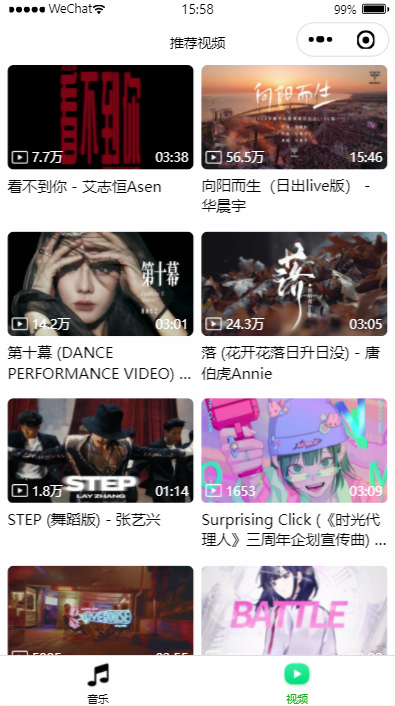
一、视频列表
1. 数据获取
1)封装 API
\services\modules\video.js
js
export function getTopMV(offset = 0, limit = 20) {
  return ddfRequest.get("/top/mv", {
    limit,
    offset
  })
}2)请求数据
在 \pages\main-video\main-video.js 的 onLoad 生命周期函数中发送网络请求,数据存到 data 中,页面使用 Mustache 语法获取 data 中的数据。
js
import { getTopMV } from '../../services/index'

async onLoad() {
  // 发送网络请求
  this.fetchTopMV()
},

async fetchTopMV() {
  // 1.获取数据
  const res = await getTopMV(this.data.offset)
  // 2.将新的数据追加到原来数据的后面
  const newVideoList = [...this.data.videoList, ...res.data]
  // 3.设置全新的数据
  this.setData({ videoList: newVideoList })
  this.data.offset = this.data.videoList.length
  this.data.hasMore = res.hasMore
},2. 界面展示
1)封装 video-item 组件
\components\video-item
properties 接收视频信息,然后使用 Mustache 语法展示。使用 CSS 布局。
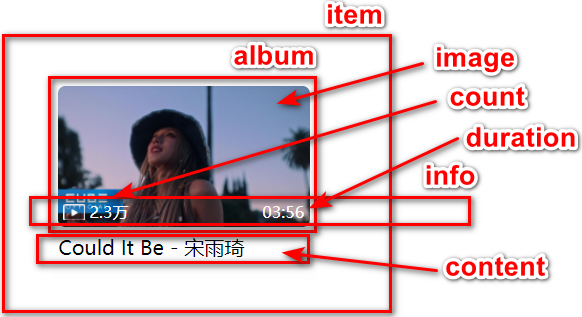
2)使用组件
\pages\main-video\main-video.wxml
xml
<view class="video-list">
  <block wx:for="{{videoList}}" wx:key="id">
    <video-item
      class="item"
      itemData="{{item}}"
      bindtap="onVideoItemTap"
      data-item="{{item}}"
    />
  </block>
</view>\pages\main-video\main-video.wxss
css
.video-list {
  display: flex;
  flex-wrap: wrap;
  justify-content: space-around;
  padding: 0 10rpx;
}

.video-list .item {
  width: 48%;
}二、上拉加载更多
官方文档:Page 函数参数
js
// 页面上拉触底事件的处理函数
onReachBottom() {
  // 1.判断是否有更多的数据
  if (!this.data.hasMore) return
  // 2.如果有更多的数据, 再请求新的数据
  this.fetchTopMV()
},
// 监听用户下拉动作
async onPullDownRefresh() {
  // 1.清空之前的数据
  this.setData({ videoList: [] })
  this.data.offset = 0
  this.data.hasMore = true
  // 2.重新请求新的数据
  await this.fetchTopMV()
  // 3.停止下拉刷新
  wx.stopPullDownRefresh()
},第二章:视频详情页
一、数据获取
1. 封装 API
接口文档:MV 地址、获取 MV 数据、推荐 MV、推荐电台
js
export function getMVUrl(id) {
  return ddfRequest.get("/mv/url", {
    id
  })
}

export function getMVInfo(mvid) {
  return ddfRequest.get("/mv/detail", {
    mvid
  })
}

export function getMVRelated(id) {
  return ddfRequest.get("/related/allvideo", {
    id
  })
}因为 /related/allvideo 接口一直没有数据返回,所以使用 /personalized/mv 或者 /personalized/djprogram 接口代替。
2. 请求数据
\pages\detail-video\detail-video.js
js
onLoad(options) {
  // 1.获取id
  const id = options.id
  this.setData({ id })

  // 2.请求数据
  this.fetchMVUrl()
  this.fetchMVInfo()
  this.fetchMVRelated()
},

async fetchMVUrl() {
  const res = await getMVUrl(this.data.id)
  this.setData({ mvUrl: res.data.url })
},
async fetchMVInfo() {
  const res = await getMVInfo(this.data.id)
  this.setData({ mvInfo: res.data })
},
async fetchMVRelated() {
  const res = await getMVRelated()
  this.setData({ relatedVideo: res.result })
}二、数据展示
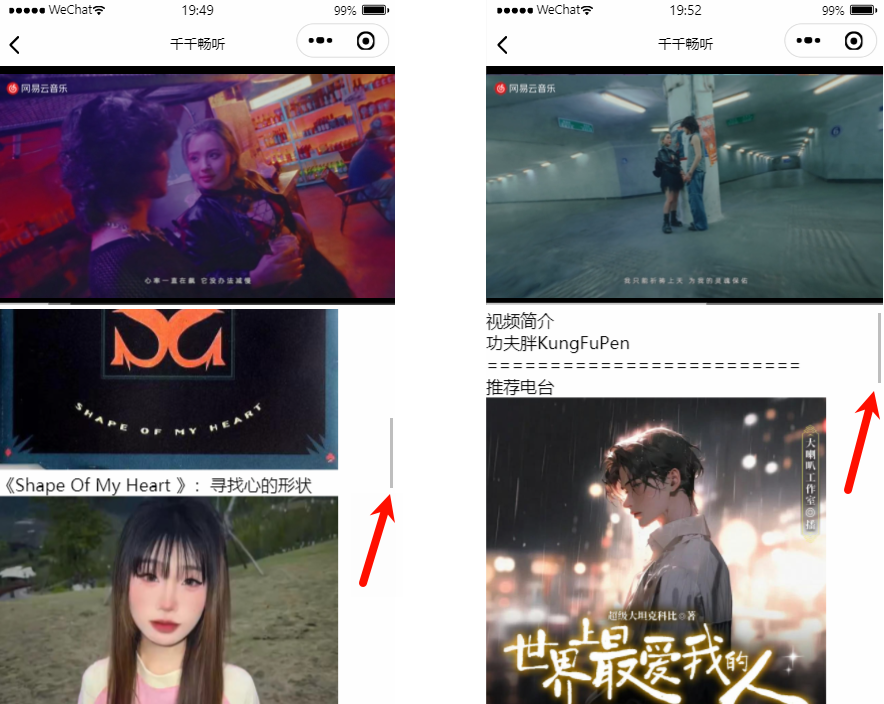
如何让滚动条局限在视频下面?
\pages\detail-video\detail-video.wxml
xml
<video
  class="video"
  src="{{mvUrl}}"
/>

<scroll-view class="content" scroll-y>
  <!-- 视频信息展示 -->

  <!-- 推荐电台展示 -->
</scroll-view>\pages\detail-video\detail-video.wxss
css
page {
  height: 100vh;
}

.video {
  width: 100%;
}

.content {
  height: calc(100% - 225px);
}video 组件默认宽度 300px、高度 225px。